

Intro
Workbench is a Windows-based application that lets you upload DataSets to Domo, which includes the following:- You can upload data from databases via data queries in ODBC/OLAP System DSNs, CSV and delimited text files, Microsoft Excel spreadsheets, Jira, QuickBooks, JSON and XML namespaces.
- You can upload data manually or through scheduled jobs.
- Workbench validates data and securely transfers data to Domo.

Workbench System Questions
What are the recommended specifications to run Workbench?
What are the recommended specifications to run Workbench?
- Operating system: Any version of Windows still supported by Microsoft
- CPU: A modern 4- or 8-core processor
- Memory: 8-16 GB
- Hard drive: 250 MB of space minimum, 2 GB recommended (though more may be required depending on the amount of data in your jobs)
What languages are available in Workbench?
What languages are available in Workbench?
- English
- Japanese
- French
- German
- Spanish
- Chinese
Do you support Windows 32 and 64-bit versions?
Do you support Windows 32 and 64-bit versions?
Are 32-bit ODBC connections supported?
Are 32-bit ODBC connections supported?
How many refresh tokens are available per client?
How many refresh tokens are available per client?
What firewall rules or ports need to be open for Workbench?
What firewall rules or ports need to be open for Workbench?
Security Questions
What type of encryption does Workbench use to transmit data?
What type of encryption does Workbench use to transmit data?
If access credentials cannot be stored as part of the Windows DSN, how are those credentials stored?
If access credentials cannot be stored as part of the Windows DSN, how are those credentials stored?
What proxy settings does Workbench use?
What proxy settings does Workbench use?
 and selecting Proxy.
My IT department requires a whitelist for all outgoing internet traffic from our network. Does Domo have an IP whitelist for purposes of running Workbench?
My IT department requires a whitelist for all outgoing internet traffic from our network. Does Domo have an IP whitelist for purposes of running Workbench?
How are access controls configured for Workbench?
How are access controls configured for Workbench?
Can Workbench update or make any changes to the original data?
Can Workbench update or make any changes to the original data?
Is multi-factor authentication available for Workbench?
Is multi-factor authentication available for Workbench?
Is any of the data transmitted by Workbench cached on the local machine?
Is any of the data transmitted by Workbench cached on the local machine?
How does Workbench authenticate with Domo?
How does Workbench authenticate with Domo?
Will changing my password cause my OAuth tokens to expire in Workbench?
Will changing my password cause my OAuth tokens to expire in Workbench?
Questions About Workbench 5 Tasks
What is the maximum size of a DataSet that Workbench supports?
What is the maximum size of a DataSet that Workbench supports?
Can Workbench run from a command line?
Can Workbench run from a command line?
How can I improve the performance of a MySQL driver?
How can I improve the performance of a MySQL driver?
- Open the the Windows ODBC Data Source Administrator by entering “ODBC” in the Start Menu search, then selecting “Data Sources (ODBC)”.
- Select your DSN, then click Configure.
-
Click Details to display additional settings.
-
In the Connection tab, mark the Allow big result sets box.
When selected, the driver does not set packet limits for results. -
In the Cursors/Results tab, mark the Don’t cache results of forward-only cursors box and the Force use of forward-only cursors box.
When selected, the driver does not cache results and uses forward-only cursors.
-
In the Connection tab, mark the Allow big result sets box.
How do I get access to network files to run a scheduled job?
How do I get access to network files to run a scheduled job?
-
Click the
 icon in the left-hand icon bar.
- Double-click the name of the job you want to set up impersonation for.
- Select Configure.
- Click Impersonation to expand that section.
- Check the Requires Impersonation box.
- Enter your domain, username, and password in the boxes.
- Click Validate.
-
Click the icon in the left-hand icon bar.
- Double-click the name of the job you want to provide domain access for.
- Click Edit under “Source.”
- Enter the network file path in the File Path field.
- Check the File on an external network box.
- Enter your credentials.
- Click Apply.
How do I clear the queue in Workbench?
How do I clear the queue in Workbench?
- The current job could be in a non-responsive state. If a job is running longer than expected, open a case with Domo Support to investigate the issue further (support@domo.com).
- You can also restart the Workbench service, which will flush the queue. Normal workflow of Workbench jobs should return after restarting. If restarting the service does not return your Workbench to normal operation, please open a case with Domo Support (support@domo.com).
How do I change data capture using Workbench?
How do I change data capture using Workbench?
-
Perform the initial load of the data using Create New Data Source.
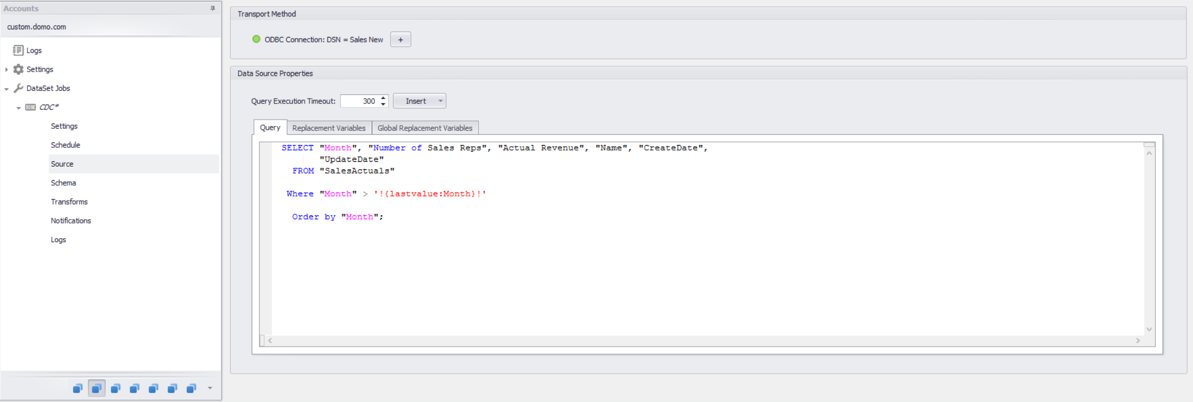
- The two key setup lines in the SQL that are very important are as follows:
-
Where “ReportDate” >
'!{lastvalue:ReportDate}!'
Ensure the Where clause contains the field that holds the value that indicate the changes since last load. The'!{lastvalue:ReportDate}!'contains the last value for the Query Variable as shown (see the Query Variable Setup section below). Call the Query Variable the same name as the field in the query that indicates the changes since the last Load. -
Order by
Ensure you have an Order By clause in the SQL statement, since it will be the value from the last row that will be saved in the Lastvalue variable. If you don’t order by the column that contains the change data capture field, then you might not get the changed rows in the query.
-
After the initial load change, the job will start appending data to the existing dataset, as shown in the example below:

If there are two group schedules in Workbench and I schedule them to run at the same time (or if the first group is still running when the second group is scheduled to start), will the two groups run concurrently, or is the second group queued ton after the first completes?
If there are two group schedules in Workbench and I schedule them to run at the same time (or if the first group is still running when the second group is scheduled to start), will the two groups run concurrently, or is the second group queued ton after the first completes?
Is there a way to move my DomoCache directory to a different disk drive?
Is there a way to move my DomoCache directory to a different disk drive?
mklink /J "C:\ProgramData\Domo\Workbench\DomoCache" "E:\Domo\Workbench\DomoCache"What does it mean when Workbench says “Live updates are not available”?This could mean a few different things. If another person is running Workbench on the same computer, this message will appear. This could also appear if there are port conflicts with other applications on the computer. To fix this, go to Workbench Settings, and in the Notifications section you will be able to update the Port.Can I do a mass export of all my job files?
Can I do a mass export of all my job files?
and select Export. You can then choose a save folder and select all of the jobs you want to export.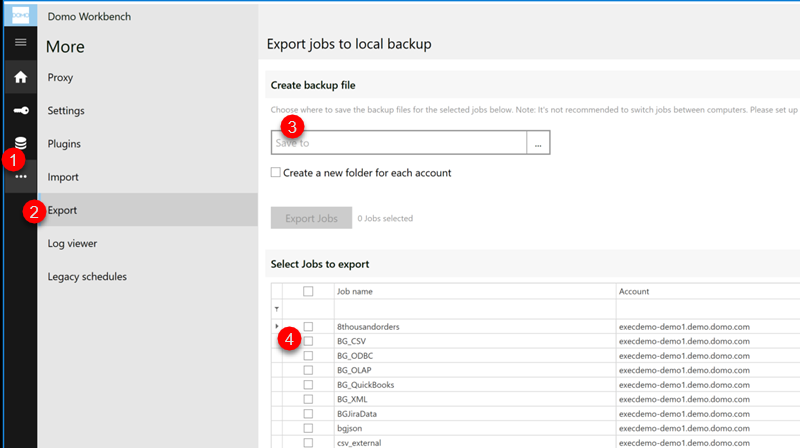
Can I run jobs more frequently than every 15 minutes?
Can I run jobs more frequently than every 15 minutes?
Does Workbench throttle CPU usage?
Does Workbench throttle CPU usage?
How do I get the list of table names or stored procedures on my database?
How do I get the list of table names or stored procedures on my database?
Where does Workbench store staging data by default? And can I move this staging data?
Where does Workbench store staging data by default? And can I move this staging data?
Can I share Workbench jobs?
Can I share Workbench jobs?
Troubleshooting
I am unable to add a user to the Domo Workbench users group. Why is this?
I am unable to add a user to the Domo Workbench users group. Why is this?
Workbench failed to install. Where can I find the logs?
Workbench failed to install. Where can I find the logs?
Domo_Workbench_<datestamp>.log and Domo_Workbench_<Datestamp>_001_DomoWorkbench64.logMy QuickBooks Workbench jobs will not run on schedule. What do I do?
My QuickBooks Workbench jobs will not run on schedule. What do I do?
What do I do if the Unsafe Save dialog appears?
What do I do if the Unsafe Save dialog appears?