Feld Entertainment on AI: Building Enterprise Apps in Hours with Domo | Domo BUILD 2026

Scott Ruble: Hi, I'm Scott Ruble. I'm CIO at Feld Entertainment. I'm here today with Juan Cruz from our Monster Jam team. How's it going?
Juan Cruz: Juan Cruz, one of the two managers at Monster Jam. Very good.
Scott Ruble: We are here today to talk about Feld's development workflow. This workflow, Juan's going to show you the steps here. Basically, what we do is we meet with our stakeholders, we get them to articulate the outcomes that they're after, and then we take this content, we work through a series of AI steps, and each one of those is built onto the next. And by the time we are done, we generate from this all the prompts, all the tooling, and everything that's needed inside of the Domo space in a Domo Procode app to generate a working application in Domo.
So we're excited to walk through the steps with you today, and you'll get to see what we do from end to end. This project took about four hours to develop the application from the meeting time through the end of it. So Juan, why don't you go ahead and jump into step one, the meeting?
Juan Cruz: Yeah, for sure. Step number one, discuss with the stakeholders what are the requirements? How do you want the app to look like? And the important part, like Scott mentioned, you want to have transcripts running here. That way you could then ingest this when you're creating the prompt. So I'm just going to put on the screen here a quick screen capture of how those transcripts look like of that conversation.
Scott Ruble: Very good. And you then take this to your next step, which is directly into AI, right?
Juan Cruz: Correct. We're going to get an AI mockup of what that conversation looked like, make sure we're all on the same page, and get some stakeholder feedback. And once we're all in agreement, we'll go to the next step.
Scott Ruble: Very good. During that step, did you use external content to do that, or was it just a transcript?
Juan Cruz: So we would take, after we look at the picture and make sure we're all in agreement, we would take external context as well, like different industry examples. And all of that would get ingested into this prompt that was built off of the Copilot transcripts and that resource material.
Scott Ruble: So you're using external examples of the application that you're looking to do just to give it a little bit of a look and feel and operational context, correct?
Juan Cruz: Correct. All that then leads into this prompt, which in conjunction with the project files is what we put into Claude to get just a shell HTML of how this app would start to look.
Scott Ruble: Very good. So it's starting to come together. You basically have at this point very rudimentary HTML and the CSS and things that go with that. And then what's your next step here?
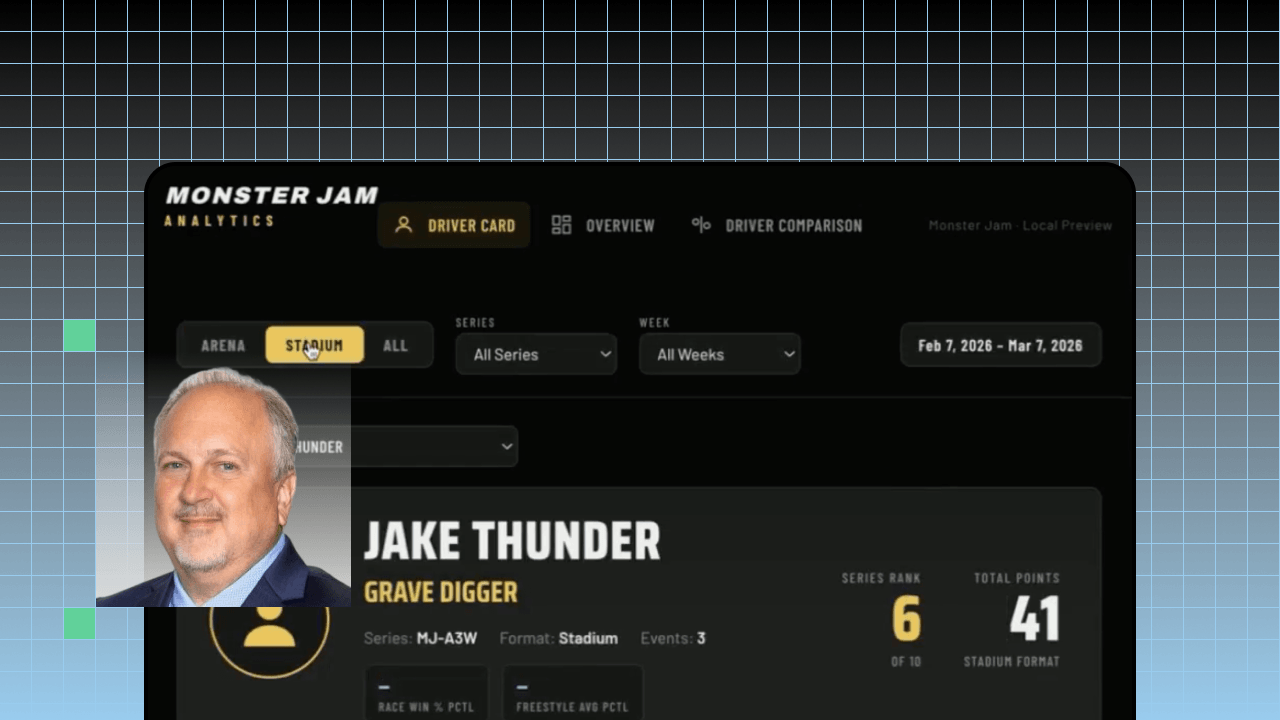
Juan Cruz: Next step would go to the Domo Procode environment. Now here we have pre-wired in the datasets, Domo datasets in the resource tab down here. For the purpose of this example, we used fake information, but in real life, we connected this to our core sets. You then get the manifest, edit it in the JSON editor, copy this, and put it right into that Claude chat so that it can reference the real-world information.
Scott Ruble: Very good. So you're kind of scaffolding this together piece by piece, assembling the different parts. And then you take this into your next step, which is to basically further the project along inside of Domo.
Juan Cruz: Yeah. So right now this is our second Claude chat. We put again all those project files, so it has the context, the prompt that we showed earlier, and then the manifest that we just displayed. Now the context of this conversation is to use that manifest to then create the coding that we're going to put into the pro-code environment. And after just some quick troubleshooting, we get the preview of the HTML in this functioning shell, and it gives us the app, JavaScript, and the CSS as well.
Scott Ruble: Very good. So at this point, you've not written any code yourself. This is all coming out of the AI workflow, correct?
Juan Cruz: Correct. Now we're going to copy and paste here the HTML, go back to the Domo Procode environment, and put that in this tab. Now for the purpose of time, you see these are orange; I already copied and pasted the same from the Claude chat. I'm going to go ahead and click save all, and then we see right here a fully functional MVP wired into our Domo datasets.
Scott Ruble: That's awesome. So you've really taken this next step where it understands what you're looking for based on the articulation. It did some basic AI functionality to align those requirements to the end look and feel that you're after. And it did pretty well to kind of hit the mark here, didn't it?
Juan Cruz: Correct. I'm going to go ahead and click save all. You're going to take this Domo Procode and generate a card from it. Once you have a card generated, you're going to insert it into a dashboard, just for ease of reference. And you see this is all in real-time, fully functional.
Once you have the card, that's when you're going to place it into the app environment. I've gone ahead and preloaded that card into this app, refreshing so you can see the latest change. And here, just for aesthetics, we removed the navigation, the Domo navigation, so it's just a quick, really quick interface to look at. And then we have the Domo app, a fully functional MVP.
Scott Ruble: That's amazing. So this project you started, you had two conversations with your stakeholders. You went through, you talked them through the requirements, and you listened for things that were being said. You prompted them to have maybe more clarity in the request, the content that they were after, the purpose, and so forth. You sort of facilitated that articulation to take place in that meeting so that the transcript could lead to this outcome, correct?
Juan Cruz: Yes. And that was really the most important part, just leading that conversation. And once you're going over the functionalities of the app, give those cues—like when they say they want it to look this way, well, why specifically? What part of the screen? Bottom left, bottom right? How should it look? What should the filter logic be? Just so everything's captured in the transcripts.
Scott Ruble: Very good. And so did you talk to them about different options in terms of the visualizations, what could be done on the screen?
Juan Cruz: Correct. Yeah, I showed them that it's a very flexible environment, so honestly, the sky's the limit. We just got it captured in those transcripts. And this driver comparison came through that conversation; they just wanted something that you could see side-by-side visually, very quickly.
Scott Ruble: That's awesome. So again, no programming on your end inside of Domo. Domo kind of hits the mark when it comes to translating that content that came out of your AI workflow and again brought it in here. The nice thing about pre-wiring it up inside Domo is that it understood the fields and understood the matching up to align with the application requirements that came out of the AI discussion.
Juan Cruz: And that's the beauty of it. A lot of MVPs can just be the shell of what you want to do with this, and the Domo Procode environment having it pre-wired is that once you have the aesthetics and the design and the workflow, it's already hooked up to your information. So you can roll this out, and then it's all thanks to this collab environment where we're able to talk it through with the live transcripts.
Scott Ruble: Now we're pretty excited about this space. So the idea here is that we have one screen set up to do digital annotation. We can write on that first projector board there, and that annotation can come into the AI workflow as well, so we're able to capture that. The other two projections there are meant to supplement and show context of other applications that may be related to it.
But basically, what we're doing in here is we're just capturing end-user, subject-matter-expert, stakeholder articulation of what outcome they need to have. And so this room is really set to take not just human-in-the-loop, but bring them in, bring them into the room—human-in-the-room—and to go for that outcome that they're needing.
Juan Cruz: That's my favorite part. You bring in industry experts that know what they want. They know their craft very well, and it's all about getting that articulation. So through the AI process and with Domo, we're able to get a fully functional app.
And we had Domo come in here as well; they did some app development with us. They were pretty excited to be a part of our early, early process here. But this is how we develop at Feld, and we're doing pretty good things. And Domo's right at the heart of all of it.
Juan Cruz: Great. Thanks, Scott.
Scott Ruble: Yep. Thanks, Juan.

I am a seasoned technology executive. I lead people. I innovate. I ensure technology investment is wisely spent. I deliver solutions that are secure and robust. I am self-motivated with high energy. Ultimately, I solve problems and deliver value.My experience is extensive, from strategic planning with C-suite executives to designing cloud computing architectures with engineers. I have built high-caliber, 100% remote, agile mobile development teams supporting millions of users, websites monetizing billions of digital ads and video streaming on OTT and VOD solutions.Formally trained as a data scientist, I have exceptional data management, SQL, and analytics skills and have built integrated decision support and finanical reporting solutions. I have implemented Salesforce and Microsoft CRM solutions for professional sports teams and as a recognized industry leader, I presented digital marketing and fan engagement best practices at MIT Sloan's Sports Analytics Conference with Verizon's precision marketing group. While launching a sports innovation center, I partnered with leading technology companies to create mobile applications, proximity beacon and Wi-Fi solutions, and smart concession carts earning recognition as an InStadium Innovation Award Finalist.Also formally trained in project management, I implemented $40MM of technology projects and completely turned around an NBA team technology ranking from 29th to 2nd in the league. And, I was trusted to lead the program management office to implement 100+ technology projects to build Little Caesars Arena, 2018 Stadium of the Year.In my various roles, I have managed hundreds of contracts, capital and operating budgets, hiring and building of teams, vendor and solution evaluations, cybersecurity and PCI compliance audits, automated API integrations, and legal discoveries. Additionally, I have led multiple global projects and have consulted with multiple foreign ministers on how to leverage blockchain and machine learning to drive economic and educational innovations to improve the lives of their citizens.I am passionate about innovation and delivering value. As a life-long learner, I enjoy working with brilliant and driven people to learn from them and help to shape the future. I am eager to connect with like-minded professionals.
Most enterprise app builds take months. Feld Entertainment built a fully functional MVP in four hours. Global CIO Scott Wruble and Monster Jam Tour Manager Juan Cruz demonstrate Feld's AI-first development workflow, using live stakeholder transcripts, AI-generated mockups, and Domo's Procode environment to ship a working, data-wired app without writing a single line of code. Watch the end-to-end build and leave with a repeatable framework for accelerating agentic app delivery in your own organization.
Domo transforms the way these companies manage business.