

Note: Domo AI is available to customers on a consumption agreement. Those not on a consumption agreement can request a trial by reaching out to their Customer Success Manager (CSM).
Intro
Every Domo instance exposes its AI Library toolkits as MCP servers at https://[YOURDOMAIN].domo.com/mcp/toolkits/…, so any MCP-capable UI tool can sign in with OAuth and build datasets, dataflows, cards, apps and workflows in your instance on your behalf.How it fits together
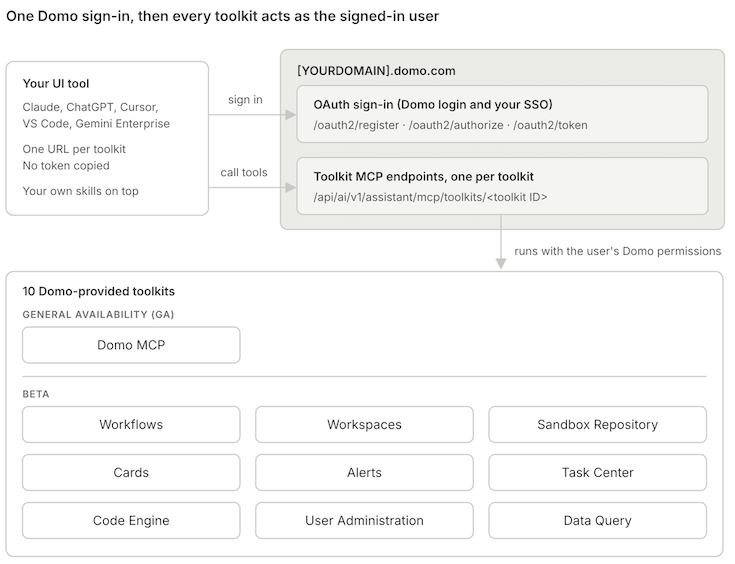
- Query data in your Domo DataSets
- List, Query Document Collections stored in Domo
- Search across your Domo instance
- Query Domo Documentation
- Create, update, and manage Domo alerts and subscriptions on cards and datasets.
- Create queues, search and count queue activity, access task history, and monitor watchlists..
- Create, validate, deploy, test and manage workflows and monitor and search executions
- Create and edit Code Engine packages
- Help manage User
- Create, list, retrieve, delete, commit versions to, share, and promote Sandbox repositories.
Required Grants
To use the AI Library feature, the following grants must be enabled for your role:- Use AI Services — Access to features and Apps built using the AI Services Layer.
- Use AI Chat — Access to the Domo AI Assistant.